Showing posts with label ax. Show all posts

Wednesday, 17 January 2018

SSRS : Report is printing an extra blank page

Some time we have a problem that report is printing an extra blank page in the last even when the data is completely being shown or sometime the blank page is showing between two pages of showing data.
This happens when the width of Body is greater than the width of Report. Normally we use to check for both width but we forgot to incorporate the left and right margin of the report with the width. To resolve this issue we need to make sure the the sizes as per following formula :

Report width >= Body width + Report left margin + Report right margin


To check for report properties just click the blank area outside the body and check for these properties:


And similarly to check for the body properties click on the body and check for its properties:


This will solve the blank page printing issue in report. 

Also note that sometimes blank page just simple occur because of using the Page break after property in the last tablix. So please make sure to set this property as false like the image below:


Dynamics AX SSRS Error: A connection attempt failed because the connected party did not properly respond after a period of time, or established connection failed because connected host has failed to respond

Sometime this error occurs while running SSRS reports. It is due to long running queries which take too much time eventually reaches to report time out limit before the generation of report. The best solution to handle this issue is to run the report in pre-process so that SSRS fetch and process all the data even before reporting window is started.

To do this you need to do the following changes in reporting objects:


  • Change the extended class of the RDP class from SrsReportDataProviderBase to SrsReportDataProviderPreProcess.
  • Add the following line in the processReport method of RDP class just after contract class object initialization:
    • .setConnection(this.parmUserConnection());
  • Locate the table being used as data set in the report and change the properties highlighted in the image below:

  • Refresh report Dataset from visual studio only to get the new field createdTransactionId.
  • Generate the incremental CIL after deployment of the report.
  • Restart SSRS for the changes to take effect and now the report can be run with out the timeout error..

  •     


Thursday, 30 June 2016

SSRS error : Domain role with multiplicity 0..1 or 1 can hold at most 1 link..

We often get the following error when we try to duplicate any SSRS report in viusal studio or  we do any change in report parameters..


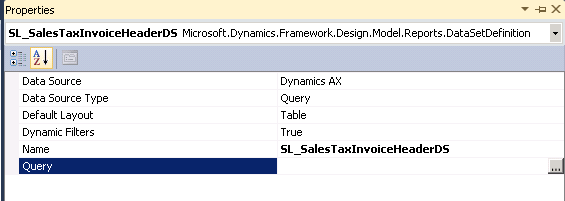
To resolve this error, we just need to reset report datasets as it is when a new dataset is created :
  • Set Data Source Type property to Query and remove anything which is already existed in Query property. (i.e Fig 1.0)


Fig 1.0 (Resetting dataset properties  )


  • Save and rebuild the report project, the above mentioned error would be resolved by now.
  • Now set the dataset properties as they were before and it will work like a charm.

Wednesday, 29 June 2016

Joining Datasources through Code using QueryBuildDataSource


Sometimes we need to add two or more datasources in our code. We use QueryBuildDatasource class for this purpose. Below is a sample job which is creating a query in code using Query class and joining two datasources by using QueryBuildDatasource class. And off course if we know how to add second datasource to first datasource, you could add more datasources using the same technique..  

static void JoiningTwoDatasourcesSample(Args _args)
{
    Query                       query;
    QueryBuildDatasource        queryBuildDatasource;
    query = new Query();

    //Adding table as the first datasource in query..
    queryBuildDatasource = query.addDataSource(tableNum(PurchTable));

    //adding table into the datasource of previously created datasource..
    queryBuildDatasource = queryBuildDatasource.addDataSource(tableNum(PurchLine));

    //Specifing which type of join you want to use in between both of the above datasources..
    queryBuildDatasource.joinMode(JoinMode::InnerJoin);

    //whether we want to use auto relations between table (i.e. True) or to create link by your own as mentioned below (i.e. False)
    queryBuildDatasource.relations(false);

    //Adding link to both table by specifying the fields of both tables which links them together..
    queryBuildDatasource.addLink(fieldNum(PurchTable, PurchId), fieldNum(PurchLine, PurchId));

    info(query.xml());

}